Several Coupons in One Cart
By default a Magento cart takes one coupon. Improved Coupon lets customers apply more, in the cart, in the checkout, and in orders created in the admin.
Setting it up
- Go to Stores > Configuration > Sales > Sales > Improved Coupon.
- Set Maximum number of coupons per order to 2 or more (3 is a good start).
With a maximum of 1 nothing changes.
In the cart
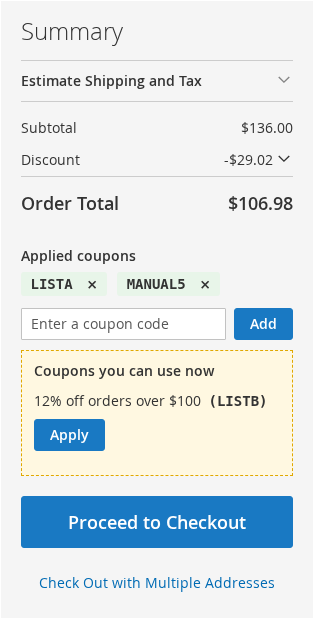
- The cart page shows Applied coupons, each with a remove (×) button, and its own Enter a coupon code field with an Add button. Magento's own coupon field is hidden, because it cannot take a second code. The mini-cart and the Hyvä cart drawer show the same block.
- The coupon list adds a coupon instead of replacing the one in the cart. A coupon typed in is added in the same way.
- Each coupon is shown as the name of the coupon and its code: "Personal coupon (L86GDO)".
- When the cart has the maximum number of coupons, the add field is hidden. Remove one to add another.
- The first coupon of the cart is Magento's coupon code, the others are kept by Improved Coupon. When you remove the first one, the next takes its place. A guest's coupons come along when the cart is merged into the customer's cart after login.
- The discount details of the cart name each coupon.
Coupons that cannot be combined
The coupons take part in the cart price rules like any coupon: the rule priority and Discard subsequent rules decide which ones apply.
A rule set to Discard subsequent rules = Yes stops the rules after it (the rules with the same or a lower priority) from applying. The coupons of those rules are refused with the message: "Coupon X cannot be used together with the coupons that are in your cart. Remove one of them to use it." Whatever the order the customer adds the coupons in, the result is the same.
Rules created in the Magento admin have "Discard subsequent rules" set to Yes by default, so rules combine only after you change it. To let two coupons work together, set Discard subsequent rules to No on the rule that comes first (and on the other one, if you want them to combine in the other order too), or give the rules different priorities (a lower number goes first).
A coupon whose rule does not apply to the cart (the conditions are not met) is not added, and one that stops applying later is taken off with a message. The coupon list may still offer a coupon that cannot be combined, because the cart does qualify for it.
Usage limits
"Uses per coupon" and "Uses per customer" are counted for every coupon of the order, and given back when the order is cancelled. The usage report counts each coupon, under how it was applied.
The checkout
When the maximum is 2 or more, the payment step of the checkout shows the same block as the cart page, in place of Magento's "Apply Discount Code" field (which takes one code and replaces the coupon of the order): the applied coupons with a remove (×) button each, the field to add a code, and "Coupons you can use now".
Adding or removing a coupon refreshes the totals and the payment methods without leaving the page, and the same rules apply as in the cart. The "almost there" hints are not shown in the checkout.
With a maximum of 1 Magento's field stays. The Hyvä Checkout product is not supported (the default Hyvä checkout, which is Magento's Luma checkout, is).
Orders created in the admin
When the maximum is 2 or more, the Apply Coupon Code block of Sales > Orders > Create New Order takes several coupons too: it lists the applied coupons, each with its own remove link, and the field stays until the order has the maximum. It follows the same rules as the storefront, so a coupon that cannot be combined is refused with a message, and the order keeps the coupons it has. The report lists these coupons as Added by an admin.
Adobe Commerce
When Commerce's own Multicoupon module is active and its setting "Multicoupon Settings > Maximum number of coupons per order" is above 1, that module keeps and counts the coupons, and the number set there is the maximum. Improved Coupon adds the cart page block and the checkout work through the module. With Commerce's setting at 1, the Improved Coupon setting applies.
In an admin order, the form is Commerce's own (it also takes several coupons). Commerce's form does not refuse a coupon that stops another one: it takes the other coupons off and tells you.
Together with Tiered Coupon
Improved Coupon works with the Mexbs Tiered Coupon extension, version 1.1.25 or newer.
- A tiered coupon can be the first coupon of the cart or a later one, and it counts as one of the coupons of the maximum.
- The customer sees the tiered coupon, not its sub coupons: in the applied coupons, and in the discount details.
- Its use is counted, and given back when the order is cancelled. The report shows it under the rule of the tier that applied.
- A tiered coupon cannot be used in a coupon link or in the coupon list (they work only with rules that have one coupon code).