The Coupon List
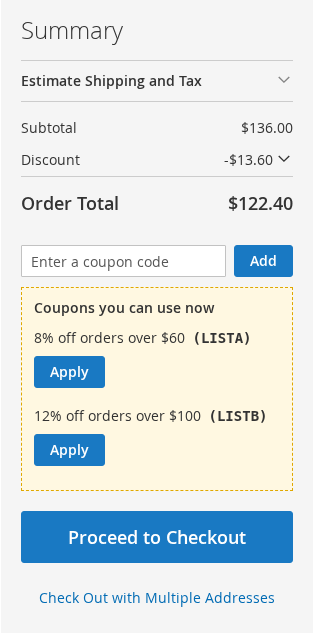
Show the customer the coupons the cart can use right now, with an Apply button, in the cart page and in the mini-cart.
Setting it up
- On the cart price rule (with one specific coupon code), switch on Show in the coupon list.
- Optionally write Text in the coupon list, for example "10% off orders over $50". If you leave it empty, the rule's store label is used, and then the rule's name.
- Save the rule.
Customers whose cart qualifies for the coupon see Coupons you can use now, with the name of the coupon, its code, and an Apply button.
How it behaves
- A coupon that is not ticked is never shown: codes are not exposed to anyone by default.
- The list shows only coupons the cart qualifies for: the rule's conditions are met, at least one item matches the rule's actions, the customer group fits, and the usage limit is not used up.
- With one coupon per cart, applying a coupon from the list replaces the coupon in the cart. With several coupons per cart it is added to them.
- A coupon that is applied already is not listed.
- In a rule's store label, set per store view, a different text can be shown to each store.
On the Hyvä theme the list is also in the cart drawer, see the Hyvä theme.