A Personal Coupon from a Pool
For a rule that generates many single-use coupons, offer each customer one coupon of the pool, so that every customer gets a code of their own.
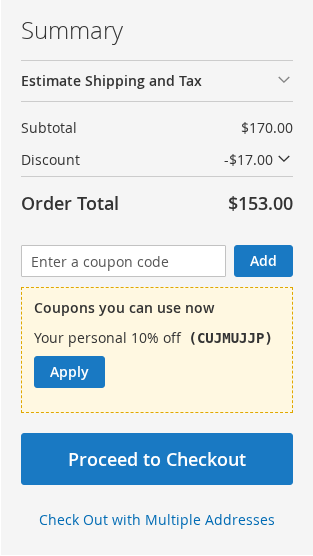
Setting it up
- On the cart price rule, choose Coupon: Specific Coupon with Use Auto Generation.
- Switch on Offer a random mass-generated coupon, and set Days a coupon is reserved for a cart (7 by default). Optionally write Text in the coupon list.
- Generate the coupons as usual (the rule's Manage Coupon Codes section). Set "Uses per Coupon" to 1 to make them single-use.
When a cart qualifies for the rule, it is offered one coupon of the pool in the coupon list, with an Apply button.
How it behaves
- The coupon is picked at random from the coupons that are not used up, not expired and not reserved, and it is reserved for that cart: no other customer is offered it, and the same customer sees the same coupon after a refresh. A logged-in customer keeps the coupon in another cart too.
- A reserved coupon that is not used goes back to the pool after the reservation days. A coupon that is used up or expires meanwhile is replaced by another one.
- A coupon is reserved only for a cart that qualifies for the rule, not for every visitor. Even so, many carts that qualify and are never used can reserve all the coupons of the pool: make the pool larger than the number of carts you expect to qualify within the reservation days.
- When no coupon is free, the cart is offered none.
- The usage report shows the rule as one row ("N generated coupons").
- The coupon list is the only place this works (not the coupon link or auto-apply).