Coupon Link Builder and QR Code
Make a coupon link, and a QR code of it, in the admin, with no need to know how the link is written.
Open Marketing > Promotions > Coupon Link Builder, or click Create a link and QR code on a cart price rule (the builder opens with that rule chosen).
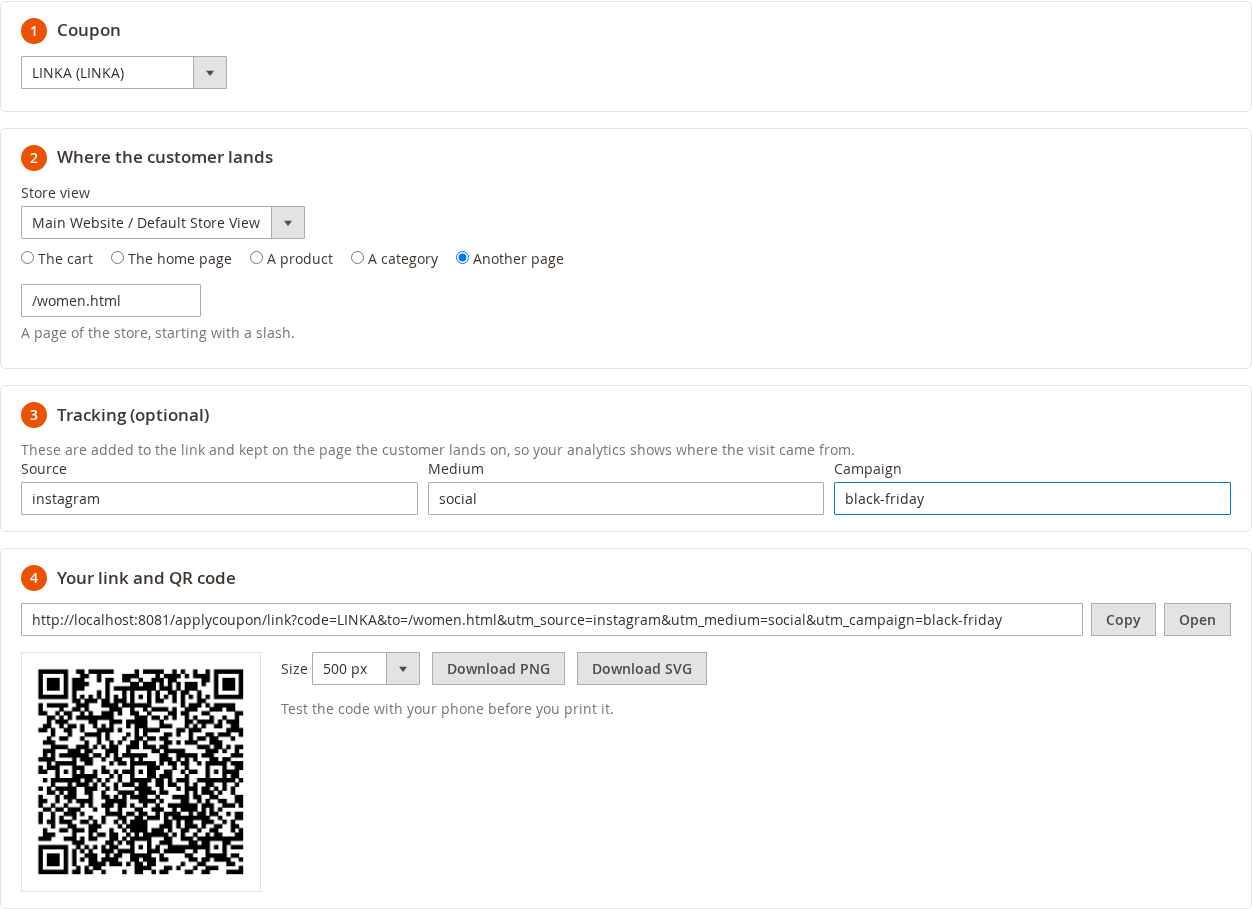
The steps
- Coupon: choose the coupon. Only rules that allow applying by a link are listed.
- Where the customer lands: the cart, the home page, a product or a category (type part of the name and pick it), or another page of the store. With several store views, choose the store view as well: the link uses that store's address.
- Tracking (optional): the source, the medium and the campaign, for your analytics.
- Copy the link, or download its QR code as a PNG (300 to 2000 px) or an SVG, for a flyer, a package insert or a poster.
The link and the code change as you change the steps.
Good to know
- Nothing is saved: the builder only makes the link.
- The QR code is drawn in your browser. The link is not sent to any outside service.
- Test the QR code with your phone before you print it.
- The permission to use the builder is Coupon Link Builder (System > Permissions > User Roles > Role Resources, under Marketing > Promotions).